
Irish Lexicography
Change to the basic search, October 2015
We’ve made a significant change to the basic search, in order to give you the best possible results, and also to be consistent with the search function on www.teanglann.ie. Previously, when you searched for a word the matching entry was displayed; with the new version of the search, you’ll see a lot of additional data as well. For example, if you search for the word sheet you’ll get the following results:
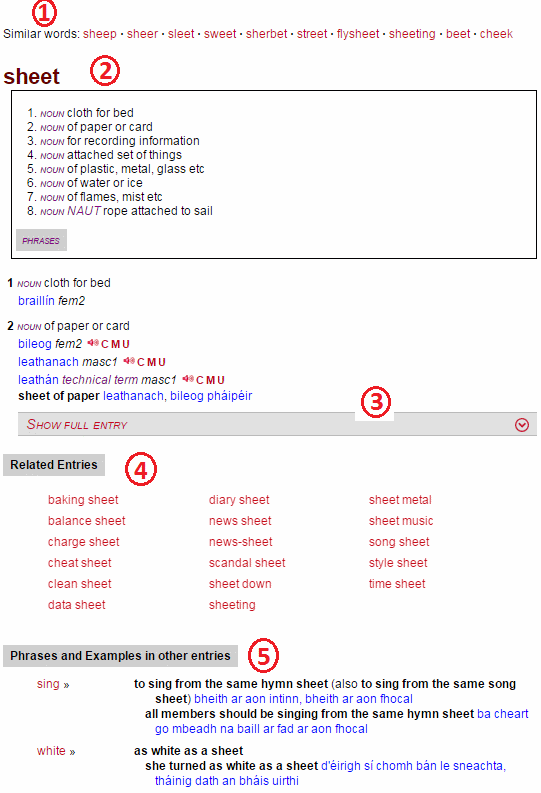
| 1. | Similar words | List of other headwords or entries in the dictionary which are similar to the word you’re searching for. |
| 2. | Exact match | If a headword matches the search string exactly it will be displayed at the top of the results. |
| 3. | Truncated entry | If the entry in the “exact match” section is a long one, it will be truncated so that the other sections of the search results are also visible. If you wish to see the entry in its entirety, simply click on the “Show full entry” bar. |
| 4. | Related Entries | If the search string also occurs in other headwords or entries in the dictionary, they’ll be displayed here. |
| 5. | Phrases and Examples in other entries | If the search string occurs in a Phrase or Example in any other entry in the dictionary, they’ll be displayed here. |
The modified search and the Dictionary App
The first version of the dictionary app was published some weeks before the modified search function was implemented. The modified search will be available in the second version of the app, which will be published early in 2016. This second version of the app will be available free of charge if you already have the first version.